DEEP FIELD
DEEP FIELD turns the M-VAVE FM-1 into an ambient drone machine. Each key you press starts a body: one voice that swells in, keeps sounding, slowly breathes and drifts, and fades out when you stop it. Up to eight bodies play at once.
- The four knobs on the HOME page shape every body at the same time.
- ORBIT moves the bodies to nearby notes on its own.
- The reverb can freeze and shimmer.
- A scene stores a whole sound, and scenes blend into each other as you change them.
- MIDI comes in over USB, Bluetooth and the TRS jack, and goes out over USB and Bluetooth.
1Install
From the browser: open the installer page in Chrome or Edge and connect the FM-1 by USB. The installer can also put M-VAVE's own firmware back.
From a terminal: download the firmware file (deepfield-X.Y.fwsc, where X.Y is the version) from the site, connect the FM-1 by USB, and run python3 base/tools/fm1_install.py deepfield-X.Y.fwsc in a copy of DEEP FIELD's source code (github.com/WisestWizard/deepfield).
If an install asks for update mode, hold REC while you switch the FM-1 on.
Installing is at your own risk. If the FM-1 only shows up as a disk called WL82 UBOOT1.00, the rescue tool fm1_rescue (from felucca-bsp) recovers it.
2The first minute
Some of the FM-1's buttons do something other than their printed name: SEL is LATCH, PLAY runs ORBIT, SEQ is FREEZE, REC is Bluetooth, and ARP opens ORBIT's page (it doesn't start an arpeggio by itself). SEL is a button and SELECT is a knob: they are different controls.
- Switch on. The scene F1 FIRST LIGHT loads and three bodies swell in, each shown on the screen as a beam. The lowest one (C3) is below the keyboard, so its beam stands thin at the left edge. SEL is lit, which means LATCH is on: each key you press keeps sounding.
- Press a few keys, one at a time. Each one swells in and stays. Its key lights up and its beam rises.
- Press one of those keys again. That body fades out, and its beam sinks.
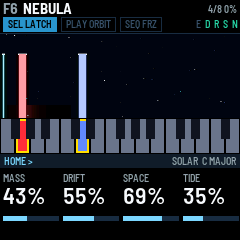
- Turn KNOB 1 (MASS): every body gets brighter or darker. Turn KNOB 3 (SPACE): they sink further into the reverb. The four boxes along the bottom of the screen are the four knobs.
- Press PLAY. ORBIT starts and PLAY lights green. Every few seconds one body slides to a nearby note in the scale: watch its beam move.
- Press SEQ. FREEZE turns on (FRZ lights): the reverb holds what it has. Press SEQ again to let it go.
- Turn PRESETS. The scene names scroll past, and the one you stop on blends in over four seconds.
- Hold SEL for a second: every body stops. Then tap SEL: LATCH turns off, and a key now sounds only while you hold it.
3The screen and the lights
The screen is laid out like the panel. The strip of keys on the screen matches your keys, and the four boxes at the bottom match the four knobs.
Key lights have three levels:
- Bright: what you are playing. A latched body's key, or a lead's key while you hold it (a lead is a note played with LATCH off: section 4).
- Half: what the machine is doing. A body fading out; the key a body started on before ORBIT moved it; the latched bodies' keys while LATCH is off; a lead fading out; the lowest or highest key, standing in for a body whose note is off the keyboard; and the key ORBIT will move a body to next, which blinks just before the move.
- Glow: a note in the scale. With the scale set to CHROMA, nothing glows.
To stop a body, press the key it started on. After ORBIT has moved a body, that is its half-lit key, not the bright one: pressing the bright key starts a second body there.
A lead's key blinks off for an instant each time it is struck, so you can see every step of an arpeggio, or an accent on a key that is already lit. While FX is held, the keys show the effect switches instead (section 8).
Button lights:
- The open page's button is lit (half-lit while FX is held).
- SEL is lit while LATCH is on, SEQ while FREEZE is on.
- SAVE is lit while the sound or a setting has changed since the last save, and blinks in the save dialog.
- PLAY shows ORBIT's mode by its colour: green for WANDER, red for ARP, and orange (green and red together) for the others. It blinks at each SCATTER move and each ARP step.
- OCT- or OCT+ is half-lit one octave from the middle, fully lit two octaves from it.
- A button you hold blinks after a third of a second until its hold takes effect (SEL stops every body, PLAY opens the ORBIT page, REC switches Bluetooth), so you can see it counting.
| Part | What it shows |
|---|---|
| Header | The scene's slot (F1–F16, U1–U16) and name, in orange while it has unsaved changes. On the right: OCT when the octave isn't zero; USB while a computer records (USB MUTE when the speaker is silenced, section 11); BLE when a computer, phone or tablet is connected over Bluetooth; DEV when the FM-1 is connected to a Bluetooth MIDI keyboard or controller; how many bodies are sounding; and how busy the processor is (LOAD in orange: see Troubleshooting). Below that, three pills named for their buttons, SEL LATCH, PLAY ORBIT and SEQ FRZ, filled while on; the letters E D R S N, lit for the effects that are on (ensemble, delay, reverb, shimmer, noise); and a bar along the bottom edge while a scene blends in. |
| The view | The bodies: as beams over their keys, or in one of the other views (section 10). Turning a knob shows its name and value large here for a moment, and messages such as LATCH OFF, ORBIT ON or SAVED appear here too. While FX is held, the five effect switches are shown here in a row. |
| The keys strip | All 27 keys, lit like the real ones: a sounding body in its colour, dim while it fades, lighter for notes in the scale, a yellow frame on a latched key, white for a lead (grey as it fades), and the body's dim colour on the key ORBIT will move it to. |
| Footer | The page band: the button that opened the page, the page's name, and < > where SELECT can go, with the model, the scale and its root on the right. Below it, the four knobs' names, values and bars, in the order of the real knobs. |
4The keys: bodies, LATCH, the scale
A body is one voice, and up to eight sound at once. A key starts a body at its note, and the body swells in over SWELL seconds (ENVELOPE page). Leaning on a key, pressing harder once it is down, makes its body brighter and adds wobble for as long as you lean; PRESS (ENVELOPE page) sets how much. The top seven keys (C#5 to G5) can't sense a lean.
With VELOCITY off (the default, on the MIDI page), every key starts its body at the same level, so chords are even. With it on, how hard you strike a key sets its body's level. MIDI notes always use their own velocity.
If you start a ninth body, one fades out quickly to make room: a body that is already fading if there is one, or else the oldest.
LATCH (SEL, lit while on; on by default): a body keeps sounding after you let go of its key. Press the same key again to stop it; it fades out over FADE seconds. A latched key has a yellow frame on the screen's keys strip. Hold SEL for a second to stop every body (the screen says EVERY BODY LET GO). Loading a scene brings its bodies in latched and turns LATCH on.
Playing leads over the bed. Tap SEL to turn LATCH off (the screen says LATCH OFF, KEYS PLAY). The bodies that were latched keep sounding: that is the bed. The keys now play leads over it. A lead is a note in the scene's own sound that plays while you hold its key and fades when you let go. Leads never latch, and ORBIT never moves them. A key whose note is already latched plays a lead on top of its body, as an accent. Up to four leads play at once; a fifth replaces the oldest. On the screen a lead is a thin white beam, and its key is white on the keys strip. Tap SEL again to go back to LATCH.
MIDI notes work the same way: with LATCH on, a MIDI note plays a body that sounds until its note off (it never latches); with LATCH off, it plays a lead.
The LEAD page (ENV, then SELECT) shapes the leads: ATTACK (1 ms to 2 s), RELEASE (30 ms to 7.7 s), LIFT (up to two octaves higher, in semitones) and LEVEL (59% matches a body; 100% is 6 dB louder).
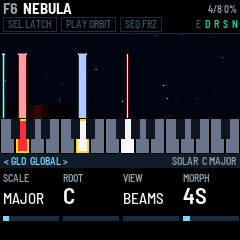
Transposing the bed. With some bodies latched, hold SEL and touch a key within a second (held longer, SEL stops every body). The pill reads SEL TRANS, and the keys stop starting bodies. Each key you play now moves the whole latched chord: its lowest note goes to that key, and the other notes keep their distance above it. The screen says TRANSPOSE and the note. The bodies glide there over GLIDE (ENVELOPE page), and the keys they started on move with them. Letting go of the key leaves the chord where it is. Over MIDI, the old notes are switched off and the new ones on. Tap SEL to go back to LATCH, or hold SEL for a second to stop every body, which also ends TRANSPOSE.
The scale. SCALE on the GLOBAL page picks the scale: CHROMA, MAJOR, MINOR, DORIAN, PHRYGIA, LYDIAN, MIXO, PENTA+ (major pentatonic), PENTA- (minor pentatonic), WHOLE or HARM- (harmonic minor). ROOT picks its root note. Every key, black keys included, always plays its own note. The scale does two things: its notes glow on the keys, and ORBIT only moves bodies to notes in it.
OCT- and OCT+ move the keys down or up an octave, up to two octaves each way. The header shows OCT and the number.
5The four forces (HOME)
HOME is the main page. Its four knobs, MASS, DRIFT, SPACE and TIDE, are the four forces: each one shapes every body at once.
| Knob | Name | What it does |
|---|---|---|
| KNOB 1 | MASS | How full and bright the sound is. What it changes depends on the model: on SOLAR, how many harmonics and how bright; on VOID, the filter cutoff (shown in Hz); on GLASS, the FM depth; on STRING, the string's brightness. Leaning on a key adds to it for that body. |
| KNOB 2 | DRIFT | How much everything wanders: the detuning, the slow drift of pitch, the wobble, the breathing of the harmonics, and how fast the stars move on the screen. |
| KNOB 3 | SPACE | How much reverb, and a little delay. The dry sound stays as it is. |
| KNOB 4 | TIDE | How much each body fades down and back up on its own slow cycle. At full, each body goes all the way to silence and back. TIDE RATE (MOTION page) sets how fast. |
MASTER is the volume.
6The pages
Each button opens its page, and the four knobs then set that page's four values, shown along the bottom of the screen. A button always opens the same page, and its light shows which page is open. Turn SELECT to step to the next or previous page, in the order of the table below: DELAY, DELAY 2 and REVERB are one, two and three steps after ENSEMBLE, for example. The page band's < and > show where SELECT can go. A page stays open until you press another page button or turn SELECT. Most values show on the screen as a percentage.
COLOUR is on both NOISE and DELAY, and WIDTH on both MOTION and NOISE 2: the page band tells you which one you are turning.
| Button | Page | KNOB 1 | KNOB 2 | KNOB 3 | KNOB 4 |
|---|---|---|---|---|---|
| HOME | HOME | MASS | DRIFT | SPACE | TIDE |
| EDIT | BODY | MODEL (also on ALGORITHM) | SHAPE | SUB | AIR |
| EDIT, SELECT once | NOISE | LEVEL (0 is off) | COLOUR (brown to white) | WIND (how fast it moves, how often it gusts) | BAND (wide, narrow, or on the bodies: see below) |
| EDIT, SELECT twice | NOISE 2 | TEXTURE (hiss, rain, crackle) | GUST (how far it swells and drops) | DUCK (how far it backs off under a chord) | WIDTH |
| ENV | ENVELOPE | SWELL (fade-in, 0.03 to 20 s) | FADE (fade-out, 0.03 to 20 s) | PRESS (how much a lean brightens) | GLIDE (how long an ORBIT move or a transpose takes) |
| ENV, SELECT once | LEAD | ATTACK (1 ms to 2 s) | RELEASE (30 ms to 7.7 s) | LIFT (0 to +2 octaves, in semitones) | LEVEL |
| LFO | MOTION | TIDE RATE | WOBBLE (vibrato) | WALK (a slow random drift of pitch) | WIDTH (stereo spread across the notes) |
| LFO, SELECT once | MOTION 2 | SPREAD | CROSS | TIMBRE | SWAY |
| FX | ENSEMBLE | ENSEMBLE (OFF, CHOR I, CHOR II or ENSEMBLE, the fullest) | ENS MIX | – | – |
| FX, SELECT once | DELAY | DLY TIME | DLY FDBK (how many repeats) | DLY MIX (how loud) | COLOUR (dark or bright repeats) |
| FX, SELECT twice | DELAY 2 | DIFFUSE (echoes blurred into a cloud) | – | – | – |
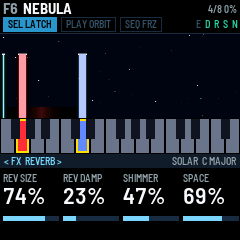
| FX, SELECT three times | REVERB | REV SIZE (how long it rings, about 0.6 to 8 s) | REV DAMP (how fast the highs die away) | SHIMMER | SPACE (the same as on HOME) |
| ARP, or hold PLAY | ORBIT | MODE | Depends on the mode (section 7) | Depends on the mode | Depends on the mode |
| ARP, SELECT once | ORBIT 2 | HOME PULL | OCTAVES (ARP, 1 to 3) | – | – |
| GLO | GLOBAL | SCALE | ROOT | VIEW | MORPH (NOW, or 1 to 30 s) |
| GLO, SELECT once | MIDI | IN CH (OMNI or 1–16) | OUT CH (1–16) | LOCAL | VELOCITY |
| GLO, SELECT twice | USB | SPEAKER (ON, AUTO, OFF) | USB LEVEL (the recording's level, 0 to -18 dB) | CLOCK OUT | – |
The models (turn ALGORITHM, or KNOB 1 on BODY). Changing the model restarts the bodies with a short fade.
| Model | What it is | MASS | SHAPE |
|---|---|---|---|
| SOLAR | Eight harmonics, each breathing on its own | More harmonics, brighter | Odd harmonics (hollow), then all of them, then even ones (like an organ) |
| VOID | Three detuned saws and a sub through a dark filter | The filter cutoff | The detune |
| GLASS | Two-operator FM with a breathing depth and a detuned second carrier | The FM depth | The ratio: 1, 2, 3, 3.5, 4, 5, 7 or 1.41 |
| STRING | A bowed string | Brightness | No effect |
| CHOIR | A buzz through three vowel formants | Moves the formants up and brings the upper two forward | The vowel: A, E, I, O, U |
| BELL | Four partials, each breathing on its own | Brighter upper partials | From the harmonic series to a bell's ratios |
| SHEPARD | Six octaves of sine under a moving window: a rise or fall that never ends | Leans the window high or low | Still at the middle; below it falls, above it rises, faster further from the middle |
| FOLD | A sine through a wavefolder (DRIFT makes the fold breathe) | The filter after the fold | How hard it folds |
SUB adds an octave below on every model. AIR adds breath or noise: the bow's noise on STRING, breath on CHOIR, the hiss of the strike on BELL, a breath of noise on SHEPARD, and noise into the fold on FOLD. It does nothing on SOLAR, VOID or GLASS.
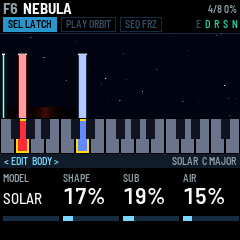
The noise layer (EDIT, then SELECT for NOISE, and once more for NOISE 2) is a stereo noise under the bodies, or on its own with no keys held: wind, sea, rain or breath.
- LEVEL turns it on and sets how loud it is (0 is off).
- COLOUR runs from brown (a deep rumble, down to 25 Hz) to white.
- WIND sets how fast the noise moves and how often a gust comes.
- BAND: at 0, a wide bed. Up to the middle, a band that narrows onto the newest note. Past the middle, narrow bands on the four loudest bodies, each as loud as its body, so the noise becomes air through the chord.
- TEXTURE: hiss, then rain (dense drops), then crackle (sparse, dusty ticks), all at the same loudness. The screen names the one you are in.
- GUST: now and then (at WIND's pace, from every few seconds to every half minute) the noise swells louder, brighter and higher over a second or three, then dies back over several. Between gusts it sits lower, by up to 18 dB as GUST goes up. The noise always comes in with a gust, and FREEZE holds the weather where it is.
- DUCK backs the noise off under a chord, by up to 12 dB, so it fills the gaps instead of covering the bodies.
- WIDTH is its stereo width.
The four forces shape the noise too: MASS brightens it, DRIFT widens its wander, SPACE sends it to the reverb, and TIDE makes it breathe. Leaning on a key brightens it, and it fades in and out at SWELL and FADE like a body. Hold FX and press C4 (white key 5) to switch it off and on again. Switched back on, it returns at the level it had when you last switched it off, or else at the scene's saved level, or else at a third. N lights in the header while it is on, and its beam on the screen rises with each gust. MIDI CC 20 sets its LEVEL.
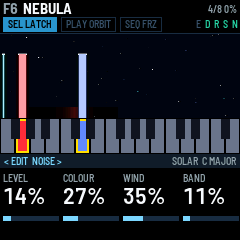
MOTION 2 (LFO, then SELECT) makes the eight bodies sound like eight separate voices instead of one sound at eight pitches.
- SPREAD gives each body its own small differences for as long as it sounds: up to 14 cents of detune, a little more or less MASS, its own breathing speed and its own place in the stereo field.
- CROSS links the bodies in fixed pairs: as one swells, it bends the other's pitch.
- TIMBRE lets each body's MASS wander slowly on its own, so the chord's colour shifts unevenly.
- SWAY moves each body across the stereo field on its own slow cycle, from one swing every 50 s to one every 3 s.
The delay echoes left, then right, then left again, each repeat a little further away. DLY FDBK sets how many repeats.
- Over most of its turn, DLY TIME is a time from 50 to 800 ms, and the screen shows it in ms. The right-hand echo comes a little later than the left one, up to 1.1 s.
- Near the top of its turn, DLY TIME becomes a note length: 1/16, 1/8, 1/4T, 1/8D, 1/4, 1/4D or 1/2 (T is a triplet, D is dotted). The tempo comes from RATE (ARP's tempo, on the ORBIT page with MODE set to ARP), or from MIDI clock when it is coming in, so the echoes land in time with ARP. A length that would be longer than 800 ms at that tempo plays at half length, still in time.
- COLOUR filters the repeats: low, they get darker and stay full; high, they get thinner and brighter, so they stand apart from the drone.
- DIFFUSE (DELAY 2) blurs each repeat: at 0 a clean tape echo, past the middle a short burst, at full a cloud that trails the drone instead of repeating it.
- Changing DLY TIME bends the pitch on its way, like tape.
7ORBIT
ORBIT moves the latched bodies by itself. Press PLAY to start it and again to stop it; when it stops, the bodies stay where they are. When it starts, the screen names the mode (WANDER EVERY 5S, for example). While it runs, the PLAY pill fills up toward the next move and flashes when it comes. The pill is named for the mode: PLAY ORBIT for WANDER, PLAY CHORD, PLAY SCATTER and so on.
Pick the mode with KNOB 1 (MODE) on the ORBIT page: press ARP, or hold PLAY. KNOB 2 to KNOB 4 change with the mode, and PLAY's colour shows it:
| Mode | PLAY | KNOB 2, 3, 4 | What happens |
|---|---|---|---|
| WANDER | green | EVERY, CHANCE, STEPS UP TO | Every EVERY seconds (give or take a quarter), with a CHANCE, one body moves to a nearby note in the scale, up to STEPS UP TO scale steps away. It never moves onto a note another body is playing. |
| CHORD | orange | EVERY, CHANCE, DISTANCE | All the bodies move together by the same number of scale steps, up to DISTANCE, so the whole chord shifts to a related one. |
| SCATTER | orange | EVERY, BODIES, STEPS UP TO | Several bodies move at once, each its own way, with looser timing (give or take a half). BODIES sets how many: one at 0, all the latched bodies at full. |
| ARP | red | RATE, GATE, ORDER | An arpeggio. The bodies keep droning while a lead (section 4) steps through their notes at RATE (40 to 240 BPM, one step per eighth note). GATE is how long each step is held (smoothly joined at the top). ORDER is UP, DOWN, UP DOWN, RANDOM, or PLAYED (the order you struck them). OCTAVES (ORBIT 2) spreads it over more octaves. ARP remembers the notes: stop every body (hold SEL) and it keeps playing until you press PLAY. The pill fills over a bar of eight steps. |
| CYCLE | orange | EVERY, CHANCE, CHORDS | The chord walks through a progression, picked with CHORDS (below). Each step is counted in scale degrees from where you played the chord. |
| ECHO | orange | EVERY, DECAY, JUMPS | Your last eight leads (keys played with LATCH off, or MIDI notes then) come back as a phrase every EVERY seconds, quieter each time, losing notes (DECAY) and jumping octaves (JUMPS) until it is gone. A new note starts it again with the new phrase. ARP's own notes don't count. |
| PULSE | orange | EVERY, CHANCE, ROLL | Every EVERY seconds, with a CHANCE, each body dips and swells back at SWELL speed, from low to high, ROLL apart: a slow strum across the chord. |
Every mode but ARP needs at least one latched body: with none, nothing moves (so ECHO needs a bed under the leads). SCATTER and ECHO have no CHANCE knob, but they still use the CHANCE last set in another mode.
CYCLE's progressions: I IV V, I VI IV V, I V VI IV, I VI III VII, I IV I V, I II V, I III VI IV and I VII IV. They are scale degrees, so in a minor key I IV V means i iv v.
HOME PULL (ORBIT 2) is the chance that a body, or in CHORD the whole chord, is pulled back to the key where it started. ORBIT leaves alone the bodies held over MIDI, and the leads. Each move goes out over MIDI as a note off and a note on.
Seeing where it goes. ORBIT picks each move when the countdown starts, so you can see it coming. A line grows from the top of the body's beam toward the key it is going to, and a faint ghost beam stands at that key. On the panel the key is half-lit and blinks just before the move; on the screen's keys strip it shows in the body's dim colour. When the move comes, the beam slides along the line and the key light follows it, while the starting key stays half-lit. On the ORBITS view, a planet's orbit grows or shrinks as it glides to the new pitch.
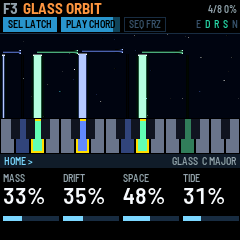
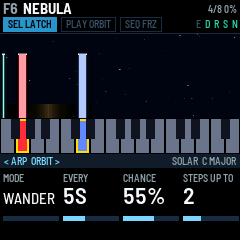
MIDI clock. While MIDI clock comes in (over USB, TRS or Bluetooth), ARP steps every eighth note of it and RATE reads EXT; EVERY counts in whole beats of that tempo, so ORBIT's moves land in time. A MIDI start restarts ARP. After two seconds without clock, ORBIT goes back to its own timing. CLOCK OUT (USB page) sends clock, with start and stop, while ARP runs from RATE, so a drum machine can follow the FM-1.
8FREEZE and the effects
FREEZE (SEQ, lit while on): the reverb holds what it has, forever. Nothing new goes in, nothing dies away, and it comes up to about the level of the dry sound. The bodies keep playing on top, dry and through the delay. The shimmer is silent while frozen. Press SEQ again to let it go. While it is frozen, the view has a frame of ice.
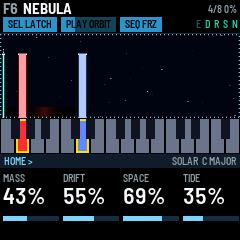
SHIMMER (REVERB page) feeds the reverb back into itself an octave higher: a rising cloud. It can't run away, whatever the reverb's size.
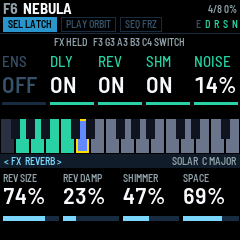
Switching effects on and off. Hold FX, and the five lowest white keys become switches, on every scene:
| Key | Switches |
|---|---|
| F3 (white key 1) | Ensemble |
| G3 (white key 2) | Delay |
| A3 (white key 3) | Reverb |
| B3 (white key 4) | Shimmer |
| C4 (white key 5) | The noise layer |
Press a key to switch its effect on, and again to switch it off. An effect the scene has at zero comes in at a useful amount: DLY MIX 27%, SPACE 35%, SHIMMER 23% (with the reverb), and ENSEMBLE CHOR I with ENS MIX at 31%. While FX is held, the screen shows the five switches in a row, each ON or OFF (the noise with its level), and the keys of the effects that are on light teal. The keys play no notes while FX is held. The switches are saved with the scene, and E D R S N in the header show which effects are on.
Tap FX without pressing a key to open the effects pages instead: ENSEMBLE, then turn SELECT for DELAY, DELAY 2 and REVERB, in the same order as the keys.
9Scenes: changing, saving, blending
A scene holds the values on the sound pages (HOME, BODY, NOISE, ENVELOPE, LEAD, MOTION, the effects and ORBIT), the effect switches, and the bodies that were latched when it was saved. The GLOBAL, MIDI and USB pages are settings instead: they stay as they are when you change scene. F1–F16 are the factory scenes. U1–U16 are yours, and start with no bodies.
Changing scene. Turn PRESETS. The scene names scroll past on the screen, and the one you stop on loads. It blends in over MORPH seconds (GLOBAL page; 4 s by default, or NOW to switch at once): the values crossfade, its bodies swell in, the old scene's bodies fade out, and a body that is in both keeps sounding. A bar along the bottom of the header shows the blend. A MIDI program change does the same.
Saving.
- Press SAVE. The screen says SAVE SCENE TO and a user slot.
- Turn PRESETS (or SELECT, or KNOB 1) to choose U1–U16.
- Press SAVE again. The sound and the bodies latched right now go into that slot, and the screen says SAVED. Press HOME instead to cancel.
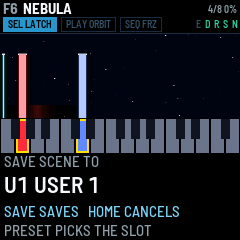
The saved scene takes the name of the scene you were playing, unless you save over the user slot you are on, which keeps its name.
Every save also stores the settings: which scene you are on, the octave, scale, root, LATCH, VELOCITY, LOCAL, the view, MORPH, the MIDI channels, the USB page, and Bluetooth on or off. Nothing is stored until you save: switch off without saving and all of it goes back to the last save.
Blending by hand. Hold GLO and lean on a key: the harder you press, the further the sound blends toward the next scene (the slot after this one). The header's bar and the screen show which scene and how far. The lean is counted from where the key settles, so press the key, wait a moment, then push. The top seven keys (C#5 to G5) can't sense a lean: hold one under GLO and the blend climbs to full over two seconds. Let go of the key and the blend stays where it is, between the two scenes, until the next scene loads. The keys play no notes while GLO is held, and only the values blend: the bodies and the model stay as they are.
The factory scenes:
| Scene | Model | Sound |
|---|---|---|
| F1 FIRST LIGHT | SOLAR | A warm major chord |
| F2 VOID TIDE | VOID | Low and breathing |
| F3 GLASS ORBIT | GLASS | Shimmer and delay; made for ORBIT |
| F4 BOWED SKY | STRING | Wide |
| F5 PULSAR | GLASS | A fast tide |
| F6 NEBULA | SOLAR | Hollow, very slow swells, drowned in reverb, a wind bed |
| F7 DEEP VOID | VOID | Sub and a long delay over a quiet crackle |
| F8 STARLIGHT | STRING | Bright, airy, high |
| F9 CATHEDRAL | CHOIR | An open vowel in a big hall |
| F10 LOW CHOIR | CHOIR | A closed vowel, low, with sub and breath on the voices |
| F11 GAMELAN | BELL | Bell ratios and shimmer; made for ORBIT |
| F12 ICE BELLS | BELL | High and wide, with a bright rain |
| F13 ASCENT | SHEPARD | Rising |
| F14 DESCENT | SHEPARD | Falling, dark, a low wind |
| F15 FOLDED SUN | FOLD | Bright, with ensemble |
| F16 TIDE POOL | FOLD | Dark, a deep tide, delay |
10The views
VIEW on the GLOBAL page picks how the screen draws the bodies. BEAMS is the one to play by; the others are different pictures over the same keys.
| View | What you see |
|---|---|
| BEAMS | Each body is a beam rising from its key, in its colour. Its height is its level, so you see it swell in and sink as it fades (dim). A latched beam has a white cap. When ORBIT moves a body, its beam slides to the new key and leaves a mark where it started. A body above or below the keys (a MIDI note, or after an octave change) stands thin at the edge. The noise layer is a soft, wide beam where its band sits, brown to white, drifting with WIND. Stars drift behind at DRIFT's speed, and FREEZE frames the view in ice. |
| MOUTH | An orange pill bottle on the left pops its cap and tumbles out a pill for every new body. A mouth on the right opens with the sound. The pills hang over their keys, high notes higher, in two colours (the body's and white), outlined yellow once latched. A body you stop flies into the mouth and is eaten. Now and then the mouth snatches the pill of a body that is still sounding and spits it back out. |
| ORBITS | A sun that pulses with the sound. Each body is a planet: its distance from the sun is its pitch, its speed follows its breathing, its size is its level, and its colour is its note. A latched planet has a ring; a fading one dims. Stars drift behind at DRIFT's speed. |
| NEBULA | The bodies' harmonics as glows along a wavy band, low notes on the left and high on the right, coloured by body, with a mark under each body's note. |
| SCOPE | A radar. Each body is a blip: its note sets the angle and its octave the distance from the centre, and it lights as the sweep passes. The sound's left channel against its right draws a figure; its shape shows the stereo width and the beating. |
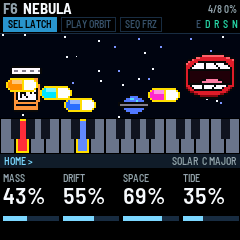
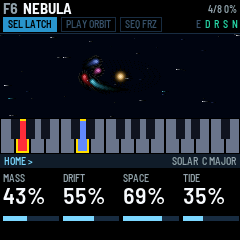
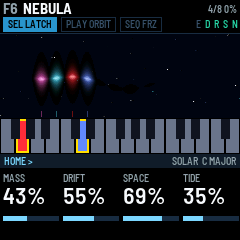
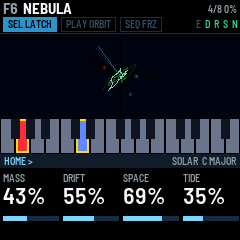
Every view except MOUTH leaves fading trails as things move.
11MIDI and Bluetooth
MIDI in comes over USB, Bluetooth and the TRS jack, on IN CH (OMNI, any channel, by default). With LATCH on, a MIDI note plays a body until its note off; with LATCH off, it plays a lead (section 4). The sustain pedal (CC 64) keeps the bodies going. Poly and channel pressure brighten the sound, like leaning on a key. Pitch bend bends everything up to two semitones either way. MIDI clock times ORBIT (section 7).
MIDI out goes over USB and Bluetooth, on OUT CH. The TRS jack is in only. A key sends a note on when you press it, and a note off when its body starts to fade, which is later than your release if the body was latched. Leaning on a key sends poly pressure. ORBIT's moves go out too. With LOCAL off (MIDI page), the keys only send MIDI and don't play DEEP FIELD.
| MIDI CC | What it does |
|---|---|
| 1 | Wobble (the mod wheel) |
| 7 | Volume |
| 16, 17, 18, 19 | MASS, DRIFT, SPACE, TIDE |
| 20 | The noise layer's LEVEL |
| 64 | Sustain |
| 71 | SHAPE |
| 72 | FADE |
| 73 | SWELL |
| 74 | MASS |
| 91 | SPACE |
| 93 | ENS MIX |
| 94 | DLY MIX |
| 120 | Silence at once |
| 121 | Controllers back to rest |
| 123 | Stop every body |
A program change loads a scene: 0–15 load F1–F16, and 16–31 load U1–U16.
Recording over USB. Plugged into a computer, the FM-1 is also a USB audio input called DEEP FIELD FM-1 (stereo, 44.1 kHz). SPEAKER on the USB page (GLO, then SELECT twice) decides what the speaker and headphones do while you record:
- AUTO (the default): when a program on the computer starts using the input (an armed track in Live, a recorder), the speaker and headphones go quiet and the header says USB MUTE. The recording is set by USB LEVEL, whatever MASTER is set to. When the program stops using the input, the speaker comes back at MASTER.
- ON: the speaker and the recording both follow MASTER, as on M-VAVE's firmware. USB LEVEL does nothing.
- OFF: the speaker stays silent, and the recording is set by USB LEVEL.
The header says USB while a computer is recording. USB LEVEL sets the recording's level with AUTO and OFF, without touching the speaker. It is -6 dB by default, so a full chord peaks about 6 dB below the loudest the recording can go.
Bluetooth. Bluetooth MIDI starts when the FM-1 does. A computer, phone or tablet can connect to it as DEEP FIELD FM-1. To connect the FM-1 to a Bluetooth MIDI keyboard or controller:
- Press REC. The screen says BLE SCANNING and then names each device it finds. Turn ALGORITHM to choose one.
- Press REC again to connect (CONNECTING, then CONNECTED). Press REC once more to disconnect.
Hold REC for a second to turn Bluetooth off or on. Save a scene to keep that choice after you switch off.
12The screen reader
DEEP FIELD works with fm1-reader, a screen reader for the FM-1. It speaks every message the screen shows, and on request reads out the scene, the page and the page's four values. DEEP FIELD gives it the way to say each of its screen words (words.tsv in the source code).
13Troubleshooting
| Problem | What to check |
|---|---|
| A key does nothing | LATCH is on (SEL lit) and that key's body was already sounding, so your press stopped it. Or TRANSPOSE is on (the pill reads SEL TRANS): tap SEL. Or LOCAL is off (MIDI page). Or FX or GLO is held: the keys play no notes then. |
| Pressing a lit key adds a note instead of stopping one | ORBIT moved that body: press the half-lit key it started on. |
| A body stops when I let go of the key | LATCH is off (SEL dark). Tap SEL. |
| Leaning on a key does nothing | The top seven keys (C#5 to G5) can't sense a lean. Or PRESS (ENVELOPE page) is at 0. |
| The knobs change the wrong thing | Another page is open: check the page band at the bottom of the screen. Press HOME. |
| Bodies move by themselves | ORBIT is running (PLAY lit). Press PLAY to stop it. |
| ORBIT does nothing | No body is latched. Every mode but ARP needs at least one. |
| The reverb won't die away | FREEZE is on (SEQ lit). Press SEQ. |
| A scene is silent | It is a user slot (U1–U16) with nothing saved in it yet: press some keys. Or TIDE at full fades each body all the way down on its cycle. Or the scene is still blending in. |
| My settings were gone after switching off | Settings are only stored when you save a scene (section 9). |
| LOAD in the header | The FM-1 once ran short of processing time, so it plays one body fewer until things have been calm for a while. |
| The buttons or knobs respond wrongly | Hold OCT- and OCT+ while you switch on: the hardware calibration asks you to press each button and turn each knob. |
| An install was cut off | Hold REC while you switch on for update mode, then install again. |